

Why RDS for MySQL?
Huawei Cloud RDS presents a significant edge over traditional databases. With RDS, you can deploy enterprise-grade MySQL databases without any worries about setup, configuration, maintenance, backups, or uptime.
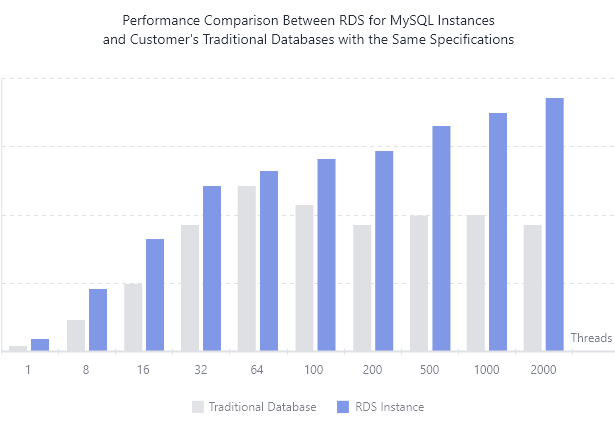
Excellent Performance
- High-Quality Hardware
RDS offers stable, high-performance database services using servers that have been proven time and again, delivering customer success in a wide range of scenarios.
- SQL Tuning
Suggestions on how to tune detected slow SQL statements are provided.
- High-Speed Access
RDS can work with an ECS in the same region to communicate with each other through the intranet. This shortens the response time of applications and reduces the cost incurred by Internet traffic.
undefined
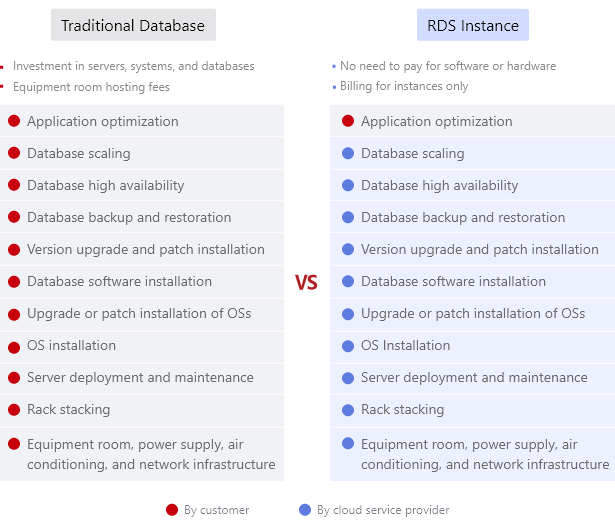
More Services at Lower Costs
- RDS Instance
You only pay for RDS for MySQL DB instances. There is no hardware or software investment needed.
- Traditional Database
You invest heavily in servers, systems, equipment hosting, and complex O&M.
undefined
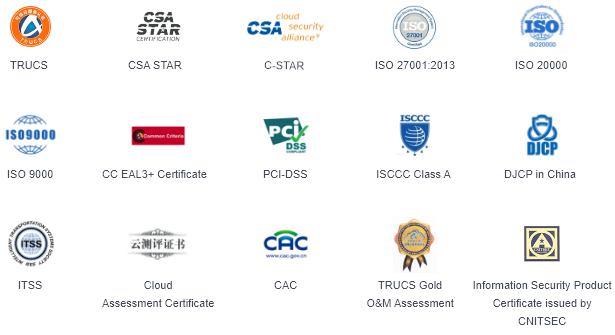
End-to-End Server Security and Data Encryption
- Access Control
Configure inbound and outbound rules for security groups hosting RDS DB instances, controlling the network range that can connect to your DB instances.
- Security Protection
Control access with multiple firewalls to keep your data safe.
- Data Encryption
Use Transport Layer Security (TLS) and Secure Sockets Layer (SSL) to encrypt data during transmission. Use static encryption and tablespace encryption to encrypt the data to be stored.
- Operation Audit
Cloud Trace Service (CTS) records every operation you perform on your DB instances.
undefined
Custom Deployment and DR Solutions
- Hot Standby
Leverage the hot standby architecture, in which failover upon fault occurrence takes only a few seconds.
- Remote DR
Restore your data to a new DB instance from backups stored in a remote region.
- Intra-city DR
Cross-AZ deployment allows DB instances in the same region to communicate with each other over an intranet but physically isolates them in different AZs.

undefined
Scalable Databases that Give You the Flexibility You Need
- A Range of Product Specifications
You can create single or primary/standby instances, add read replicas to elastically scale out, or change your single-node instance to primary/standby.
- Elastic Scaling
Add or delete read replicas to adapt to sudden surges or sudden drops in traffic.
- Multiple Instance Classes
General-purpose instances offer excellent performance at a low price point by sharing CPU resources on the same physical machine. Dedicated instances offer premium performance by using CPU and memory resources dedicated to only your services.

undefined
Save Time, Stay Productive
- Backup and Restoration
Restore data from backups to any point in time, and save data for up to 732 days, with no data loss.
- Real-Time Monitoring
Monitor DB instance statuses and performance metrics and receive helpful suggestions.
- Automatic Reminders
Define monitoring objects and alarm rules to help you keep track of the statuses of your DB instances.
undefined
Product Advantages
-
3X the Performance
Huawei enhanced MySQL kernel (HWSQL) improves the connection pool performance, providing 3 times the performance in high-concurrency scenarios.
Huawei enhanced MySQL kernel (HWSQL) improves the connection pool performance, providing 3 times the performance in high-concurrency scenarios.
-
15+ Security Certifications
First in China to earn ISO/IEC 27034 and CSA STAR V4 certifications
First in China to earn ISO/IEC 27034 and CSA STAR V4 certifications
-
Up to 732-Day Backup Retention
Primary/standby switchover within seconds, lower RTO, automated backup and restoration, backups saved for 732 days, no data lost
Primary/standby switchover within seconds, lower RTO, automated backup and restoration, backups saved for 732 days, no data lost
-
Fast Scaling
Scale instance specifications and storage in just minutes and view monitoring metrics in real time.
Scale instance specifications and storage in just minutes and view monitoring metrics in real time.
Application Scenarios
Scalability: IoT Apps
Internet of Things (IoT) apps
Dedicated instances support high concurrency and throughput, making them an excellent choice for IoT applications. Scale out with Distributed Database Middleware (DDM) to further increase capacity.
Advantages
Excellent Performance: Database performance is maintained in high concurrency scenarios.
Process Huge Numbers of Read Requests: Create additional read replicas in a region to increase application throughput.
Reliability: E-Commerce
Online Stores and Mobile E-Commerce
RDS for MySQL is a reliable, cost-effective database for e-commerce and mobile-commerce applications, enabling your applications to handle spikes in traffic and sales without downtime or data loss.
Advantages
No Data Lost: Replication to the standby instance is performed with enhanced semi-synchronous replication, ensuring zero data loss under heavy loads.
Cost-effective: RDS for MySQL is open source, making it an inexpensive choice for enterprises.
Security: E-Government
Digital Public Services
RDS for MySQL can be securely scaled for e-government platforms to handle requests from millions of users.
Advantages
Feature-rich: A rich suite of business continuity management functions are available, including backup and restoration, metric monitoring, alarm reporting, and primary/standby high availability configurations.
Secure: VPCs, firewalls, security groups, and SSL connections are used to harden security and protect data.
Performance: Mobile Apps
Mobile Apps and Mobile Gaming
Dedicated instances with high availability provide the high performance and reliability needed to run online mobile apps and games with millions of users. Scale out with Distributed Database Middleware (DDM) to further increase capacity.
Advantages
Huge Number of Connections Supported: RDS for MySQL supports tens of thousands of connections with fast response times.
Enhanced Primary/Standby Replication: Multi-threaded replication reduces replication delays.
Getting Started with RDS for MySQL
Flowchart

Procedure
| Operation | Reference |
|---|---|
Creating an RDS DB instance | |
Connecting to your RDS DB instance |
User Guide
-
Connecting to an RDS for MySQL Instance
You can connect to an RDS for MySQL instance through a command-line interface (CLI), graphical user interface (GUI), Data Admin Service (DAS), or using Java database connectivity (JDBC).
You can connect to an RDS for MySQL instance through a command-line interface (CLI), graphical user interface (GUI), Data Admin Service (DAS), or using Java database connectivity (JDBC).
-
Migration Solution Overview
You can migrate data from DDM, GaussDB, GaussDB(for MySQL), self-managed MySQL databases, self-managed Oracle databases, or MySQL databases built on other clouds to RDS for MySQL, or from one RDS for MySQL instance to another RDS for MySQL instance.
You can migrate data from DDM, GaussDB, GaussDB(for MySQL), self-managed MySQL databases, self-managed Oracle databases, or MySQL databases built on other clouds to RDS for MySQL, or from one RDS for MySQL instance to another RDS for MySQL instance.
-
Suggestions on RDS for MySQL Parameter Tuning
Parameters are key configuration items in a database system. Improper parameter settings may adversely affect database performance. This section describes some important parameters for your reference. For details, visit the MySQL official website.
Parameters are key configuration items in a database system. Improper parameter settings may adversely affect database performance. This section describes some important parameters for your reference. For details, visit the MySQL official website.
-
Creating a Parameter Template
You can use database parameter templates to manage the DB engine configuration. A database parameter template acts as a container for engine configuration values that can be applied to one or more DB instances.
You can use database parameter templates to manage the DB engine configuration. A database parameter template acts as a container for engine configuration values that can be applied to one or more DB instances.
-
Creating a Database
After a DB instance is created, you can create databases on it.
If your RDS instance is associated with a DDM instance, go to the DDM console to manage databases and accounts.
After a DB instance is created, you can create databases on it.
If your RDS instance is associated with a DDM instance, go to the DDM console to manage databases and accounts.
-
Changing a Private Domain Name
Changing the private domain name will interrupt your database connection. To reconnect to the instance, change the connection address of your applications. The new private domain name is applied to the instance about 5 minutes after the change.
Changing the private domain name will interrupt your database connection. To reconnect to the instance, change the connection address of your applications. The new private domain name is applied to the instance about 5 minutes after the change.