

Huawei Cloud SFS Functions
NFS
Network File System (NFS) is a distributed file system protocol that allows different computers and operating systems to share data over a network. After the NFS client is installed on multiple ECSs, mount the file system to implement file sharing between ECSs. The NFS protocol is recommended for Linux clients.
 Released in: all regions
 Mounting an NFS File System to ECSs (Linux)
Mounting an NFS File System to ECSs (Windows)
CIFS
Common Internet File System (CIFS) is a protocol used for network file access. Using the CIFS protocol, network files can be shared between hosts running Windows. The CIFS protocol is recommended for Windows clients.
Released in: all regions
Mounting a CIFS File System to ECSs (Windows)
Multi-VPC Access
Multi-VPC access can be configured for an SFS Capacity-Oriented file system so that ECSs in different VPCs can share the same file system, as long as the VPCs that the ECSs belong to are added to the VPC list of the file system or the ECS IP addresses are added as authorized IP addresses of the VPCs.
An SFS Turbo file system allows two or more VPCs in the same region to interconnect with each other through VPC peering connection. In this case, different VPCs are in the same network, and ECSs in these VPCs can share the same file system.
Released in: all regions
Encryption
SFS provides you with the encryption function. You can encrypt your data on the newly created file systems if needed.
Released in: all regions
Monitoring
Cloud Eye is a multi-dimensional resource monitoring service. With Cloud Eye, you can view the file system usage and service running status, and respond to exceptions in a timely manner to ensure smooth running of services.
Released in: all regions
Advantages of Huawei Cloud SFS
-
Durable
A multi-level reliability architecture ensures a data durability of 99.99999999% (10 nines) and service availability of 99.95%.
A multi-level reliability architecture ensures a data durability of 99.99999999% (10 nines) and service availability of 99.95%.
-
Efficient
High IOPS, low latency, and high bandwidth options are all offered so you can design a storage solution tailored to your specific performance needs.
High IOPS, low latency, and high bandwidth options are all offered so you can design a storage solution tailored to your specific performance needs.
-
Easy to Use
Fully-hosted file storage frees you from the complexities of hardware deployment and maintenance. Leave the infrastructure to us.
Fully-hosted file storage frees you from the complexities of hardware deployment and maintenance. Leave the infrastructure to us.
-
Secure
HUAWEI CLOUD security comprehensively secures your data. VPC-based user authentication keeps your data isolated in your own cloud.
HUAWEI CLOUD security comprehensively secures your data. VPC-based user authentication keeps your data isolated in your own cloud.
Application Scenarios
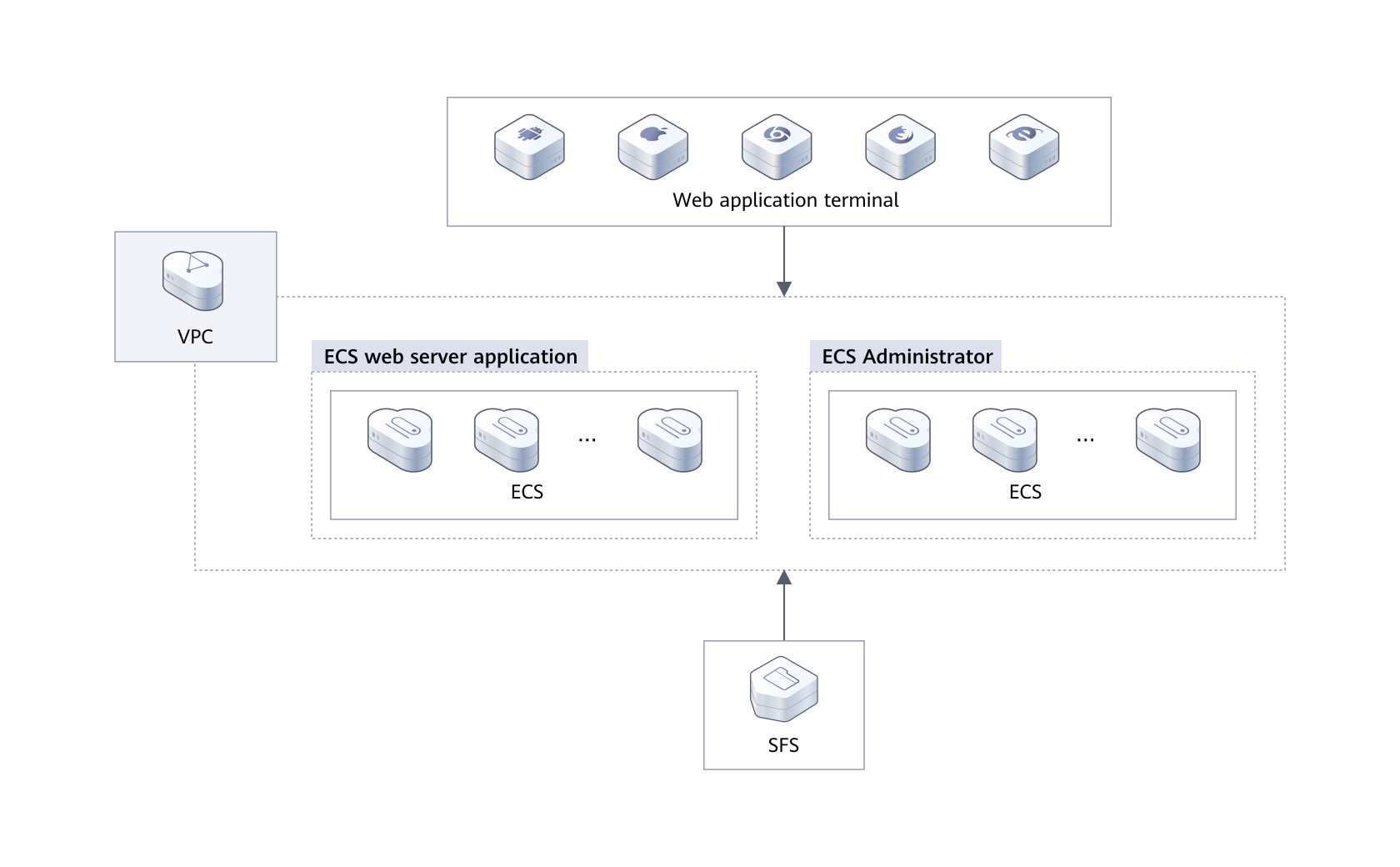
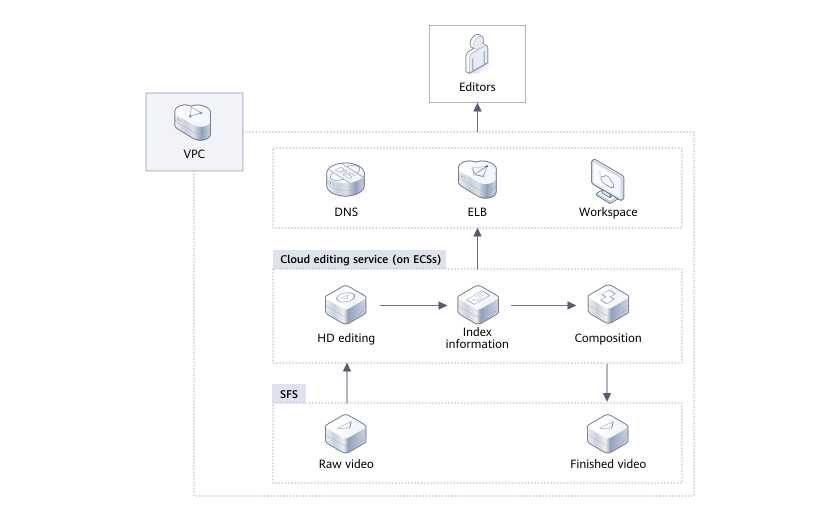
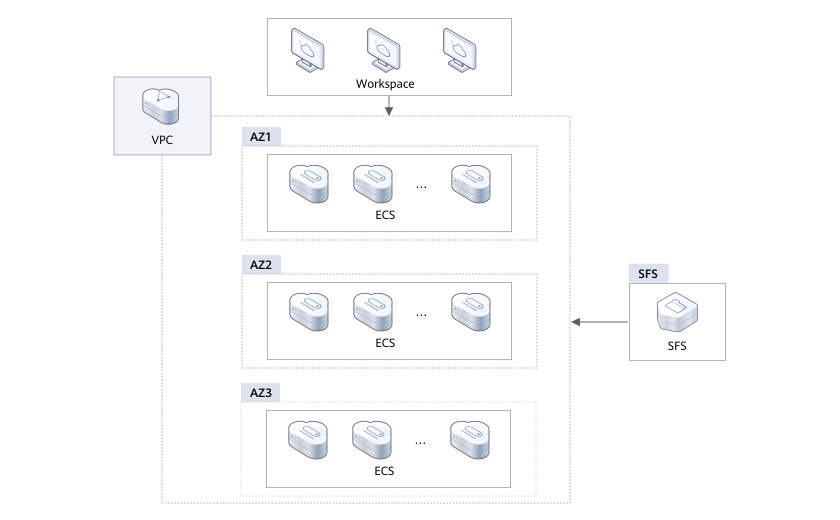
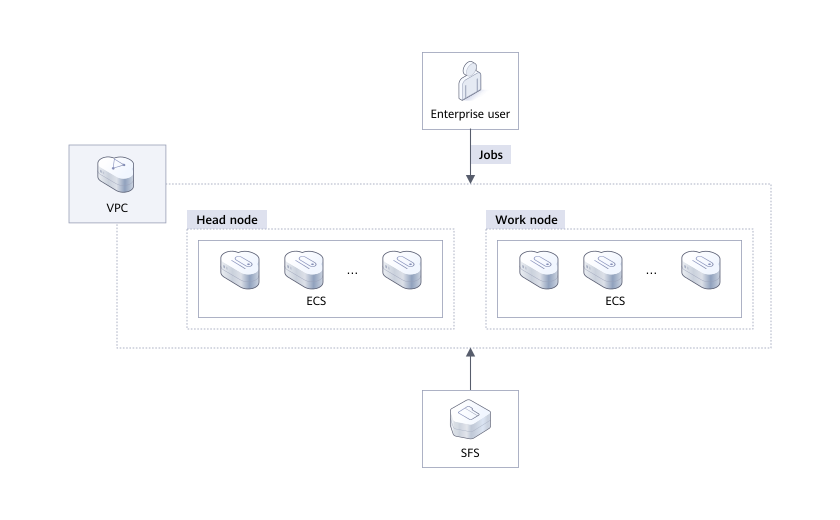
Service Overview
-
Functions
Before using SFS, you are advised to learn basic concepts such as NFS and CIFS in SFS Basic Concepts to better understand the functions provided by SFS.
Before using SFS, you are advised to learn basic concepts such as NFS and CIFS in SFS Basic Concepts to better understand the functions provided by SFS.
-
File System Types
SFS provides two types of file systems: SFS Capacity-Oriented and SFS Turbo. SFS Turbo is classified into SFS Turbo Standard and SFS Turbo Performance.
SFS provides two types of file systems: SFS Capacity-Oriented and SFS Turbo. SFS Turbo is classified into SFS Turbo Standard and SFS Turbo Performance.
-
File System Encryption
SFS provides you with the encryption function. You can encrypt your data on the newly created file systems if needed.
SFS provides you with the encryption function. You can encrypt your data on the newly created file systems if needed.
-
Shared Responsibilities
Huawei guarantees that its commitment to cyber security will never be outweighed by the consideration of commercial interests.
Huawei guarantees that its commitment to cyber security will never be outweighed by the consideration of commercial interests.
-
Identity Authentication and Access Control
SFS is interconnected with IAM, so that you can assign different permissions to employees to access your SFS resources for fine-grained permissions management.
SFS is interconnected with IAM, so that you can assign different permissions to employees to access your SFS resources for fine-grained permissions management.
-
Data Protection
SFS supports server-side encryption, which allows you to encrypt the data stored in SFS file systems. When data is accessed, SFS automatically decrypts the data and then returns it to you.
SFS supports server-side encryption, which allows you to encrypt the data stored in SFS file systems. When data is accessed, SFS automatically decrypts the data and then returns it to you.
-
Billing
The default billing mode is pay-per-use. With this billing mode, creating file systems is free of charge and your service account is only billed for the amount of time (hours) resources used for.
The default billing mode is pay-per-use. With this billing mode, creating file systems is free of charge and your service account is only billed for the amount of time (hours) resources used for.
-
Permissions Management
If you need to assign different permissions to employees in your enterprise to access your SFS resources on Huawei Cloud, Identity and Access Management (IAM) is a good choice for fine-grained permissions management.
If you need to assign different permissions to employees in your enterprise to access your SFS resources on Huawei Cloud, Identity and Access Management (IAM) is a good choice for fine-grained permissions management.
-
Project and Enterprise Project
A project is used to group and isolate OpenStack resources, such as compute, storage, and network resources. A project can be a department or a project team. Multiple projects can be created for one account.
A project is used to group and isolate OpenStack resources, such as compute, storage, and network resources. A project can be a department or a project team. Multiple projects can be created for one account.
Huawei Cloud SFS Limitations
Restrictions
SFS Capacity-Oriented supports the NFSv3 and CIFS protocols. The default export options in NFSv3 are rw, no_root_squash, no_all_squash, and sync. In the CIFS protocol, the default export options are rw and sync.
Encrypted CIFS file systems do not support CopyChunk replication.
To obtain better performance, you are advised to use the operating systems listed in Supported Operating Systems, which have passed the compatibility test.
CIFS file systems cannot be mounted to Linux servers.
Currently, SFS does not support replication.
Currently, SFS does not support cross-region access.
A file system cannot be mounted to multiple accounts.
The SMB file system provides permission control only on the file system level but not on the file/directory level.
SFS Capacity-Oriented
SFS Capacity-Oriented can be accessed only on the intranet and used only on the cloud.
Currently, NFSv3 protocol is supported (NFSv4 is not supported), and CIFS protocol is supported (SMB 2.0, 2.1, and 3.0 are supported, but SMB 1.0 is not supported).
One file system can support either the NFS or CIFS protocol.
A maximum of 10,000 compute nodes can be mounted to and access a single file system at the same time.
The maximum capacity of a single file system is 4 PB, and that of a single file is 240 TB.
Multi-VPC access is supported. You can add a maximum of 20 VPCs for one file system and create a maximum of 400 ACL rules for all added VPCs.
If there are more than 20 enterprise projects, SFS Capacity-Oriented file systems may fail to be created. SFS Turbo file systems are recommended.
SFS Turbo
SFS Turbo allows on-premises IDCs to access using Direct Connect, VPN, or Cloud Connect, but does not allow the direct access from the Internet.
Only the NFSv3 protocol is supported (NFSv4 is not supported).
A maximum of 500 compute nodes can be mounted to and access a single file system at the same time.
The maximum capacity of a single file system is 320 TB, and the maximum capacity of a single file is 16 TB.
Maximum number of files supported by a single file system = Capacity/16 KB. For example, the maximum number of files supported by a 500 GB file system is 32,768,000 (500 GB/16 KB = 500 x 1024 x 1024/16).
By default, a single directory contains a maximum of 2 million files.
The maximum full path is 1024 bytes, and the maximum file name length is 255 bytes.
The maximum soft link length is 1024 bytes.
The maximum number of hard links is 255.
The maximum directory depth is 100 layers.
Getting Started
Before using SFS, you need to make the following preparations: Registering with Huawei Cloud, Topping Up Your Account, Creating an IAM User
You can create a file system and mount it to multiple ECSs. Then the ECSs can share this file system. You can create two types of file systems: SFS Capacity-Oriented and SFS Turbo.
If a file system is no longer used and needs to be deleted, you are advised to unmount the file system and then delete it.
Mount the file system to ECSs so that they can share the file system.
Mount the file system to ECSs so that they can share the file system.
Before creating a file system, ensure that at least a VPC and an ECS have been created and the ECS belongs to the created VPC.
FAQs
FAQs
-
What Is SFS Turbo?
SFS Turbo enables high-performance file storage that can be expanded and shrunk on demand. It provides file sharing services for Elastic Cloud Servers (ECSs). SFS Turbo supports the Network File System (NFS) protocol (only NFSv3). You can seamlessly integrate existing applications and tools with the service.
SFS Turbo provides an easy-to-use graphical user interface (GUI). On the GUI, users can create and configure file systems, saving effort in deploying, resizing, and optimizing file systems.
In addition, SFS Turbo features high reliability and availability. It can be elastically expanded, and it performs better as its capacity grows. The service is suitable for a wide range of scenarios, including enterprise office, high-performance websites, and software development. For details about the file system types, see File System Types.
-
What Access Protocols Are Supported by SFS?
SFS Capacity-Oriented supports standard NFSv3 and CIFS protocols. SFS Turbo supports standard NFSv3 protocol.
Both SFS Capacity-Oriented, SFS 3.0 Capacity-Oriented, and SFS Turbo support the standard NFSv3 protocol.
-
How Many Servers Can a File System Be Mounted To?
You can mount an SFS Capacity-Oriented file system to a maximum of 10,000 servers.
You can mount an SFS Turbo file system to a maximum of 500 servers.
-
Can the Capacity of a File System Be Expanded?
SFS Capacity-Oriented file systems: support online capacity resizing.
SFS Turbo file systems: support online capacity expansion. During the capacity expansion, mounting a file system may fail and the connection being used for mounting will experience about a 30-second (max. 3 minutes) I/O latency. Online capacity expansion is not available for some earlier version file systems. To expand their capacity, submit a service ticket.
-
Can a File System Be Mounted to Multiple Accounts?
Currently, a file system cannot be mounted to multiple accounts.
-
Does SFS Support Cross-Region Mounting?
Currently, SFS does not support cross-region mounting. A file system can be mounted only to ECSs in the same region.
For example, the file systems in CN North-Beijing4 can be mounted to the ECSs in CN North-Beijing4 only.
-
How Do I Check Whether the Subscriber Is in Arrears?
You can view the outstanding amount on the Billing Center page. If your account is in arrears, the system processes resources and fees in SFS according to the retention period rules. For more information, see Service Suspension and Resource Release. To prevent service suspension and resource release, repay arrears or top up in time.
Procedure
Log in to the management console.
Click Billing in the upper right corner of the page to switch to the Billing Center page.
On the Overview page, you can view the outstanding amount of the current account.
Top up your account to pay arrears if any.
 NOTE:
NOTE: For details about how to repay the outstanding amount, see Making Repayments.
For more information about orders, unsubscription, coupons, and consumption details, see the Billing Center User Guide.
Videos
SFS Service Introduction
03:04
creating a File System and Mounting It on a Linux ECS
05:51