

SFS Functions
Table 1 lists common SFS functions.
Before using SFS, you are advised to learn basic concepts such as NFS and CIFS in SFS Basic Concepts to better understand the functions provided by SFS.
√: indicates that the file system type supports this function.
×: indicates that the file system type does not support this function.
Table 1 Common functions
|
Function
|
Description
|
SFS Capacity-Oriented
|
SFS Turbo
|
|---|---|---|---|
Network File System (NFS) is a distributed file system protocol that allows different computers and operating systems to share data over a network. After the NFS client is installed on multiple ECSs, mount the file system to implement file sharing between ECSs. The NFS protocol is recommended for Linux clients. |
√ |
√ |
|
Common Internet File System (CIFS) is a protocol used for network file access. Using the CIFS protocol, network files can be shared between hosts running Windows. The CIFS protocol is recommended for Windows clients. |
√ |
× |
|
A backup is a complete copy of a file system at a specific time and it records all configuration data and service data at that time. If your file system is faulty or a logical error occurs in the data in the file system, you can use the backup data to restore the data quickly. |
× |
√ |
|
SFS provides you with the encryption function. You can encrypt your data on the newly created file systems if needed. |
× |
√ |
|
Cloud Eye is a multi-dimensional resource monitoring service. With Cloud Eye, you can view the file system usage and service running status, and respond to exceptions in a timely manner to ensure smooth running of services. |
√ |
√ |
|
An enterprise project manages multiple resource instances by category. Resources and projects in different cloud service regions can be classified into one enterprise project. An enterprise can classify resources based on departments or project groups and put relevant resources into one enterprise project for management. Resources can be migrated between enterprise projects. If there are more than 20 enterprise projects, SFS Turbo file systems are recommended. |
√ |
√ |
Service Overview
-
Functions
Before using SFS, you are advised to learn basic concepts such as NFS and CIFS in SFS Basic Concepts to better understand the functions provided by SFS.
Before using SFS, you are advised to learn basic concepts such as NFS and CIFS in SFS Basic Concepts to better understand the functions provided by SFS.
-
File System Types
SFS provides two types of file systems: SFS Capacity-Oriented and SFS Turbo. SFS Turbo is classified into SFS Turbo Standard and SFS Turbo Performance.
SFS provides two types of file systems: SFS Capacity-Oriented and SFS Turbo. SFS Turbo is classified into SFS Turbo Standard and SFS Turbo Performance.
-
File System Encryption
SFS provides you with the encryption function. You can encrypt your data on the newly created file systems if needed.
SFS provides you with the encryption function. You can encrypt your data on the newly created file systems if needed.
-
Shared Responsibilities
Huawei guarantees that its commitment to cyber security will never be outweighed by the consideration of commercial interests.
Huawei guarantees that its commitment to cyber security will never be outweighed by the consideration of commercial interests.
-
Identity Authentication and Access Control
SFS is interconnected with IAM, so that you can assign different permissions to employees to access your SFS resources for fine-grained permissions management.
SFS is interconnected with IAM, so that you can assign different permissions to employees to access your SFS resources for fine-grained permissions management.
-
Data Protection
SFS supports server-side encryption, which allows you to encrypt the data stored in SFS file systems. When data is accessed, SFS automatically decrypts the data and then returns it to you.
SFS supports server-side encryption, which allows you to encrypt the data stored in SFS file systems. When data is accessed, SFS automatically decrypts the data and then returns it to you.
-
Billing
The default billing mode is pay-per-use. With this billing mode, creating file systems is free of charge and your service account is only billed for the amount of time (hours) resources used for.
The default billing mode is pay-per-use. With this billing mode, creating file systems is free of charge and your service account is only billed for the amount of time (hours) resources used for.
-
Permissions Management
If you need to assign different permissions to employees in your enterprise to access your SFS resources on Huawei Cloud, Identity and Access Management (IAM) is a good choice for fine-grained permissions management.
If you need to assign different permissions to employees in your enterprise to access your SFS resources on Huawei Cloud, Identity and Access Management (IAM) is a good choice for fine-grained permissions management.
-
Project and Enterprise Project
A project is used to group and isolate OpenStack resources, such as compute, storage, and network resources. A project can be a department or a project team. Multiple projects can be created for one account.
A project is used to group and isolate OpenStack resources, such as compute, storage, and network resources. A project can be a department or a project team. Multiple projects can be created for one account.
Application Scenarios
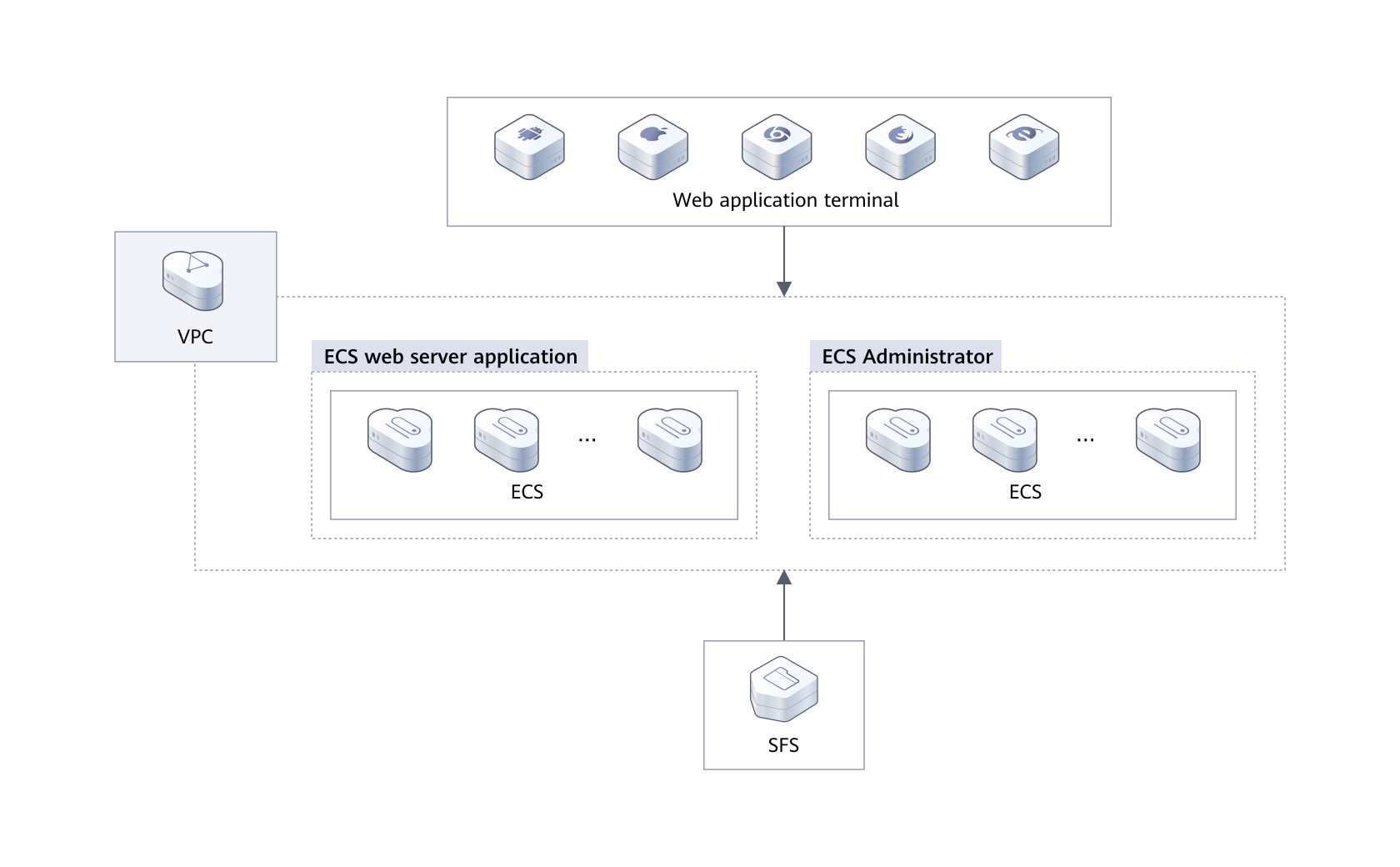
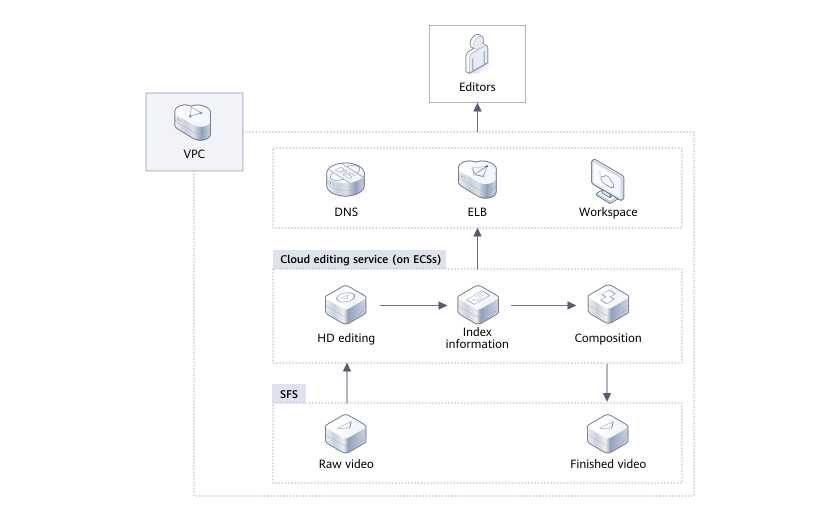
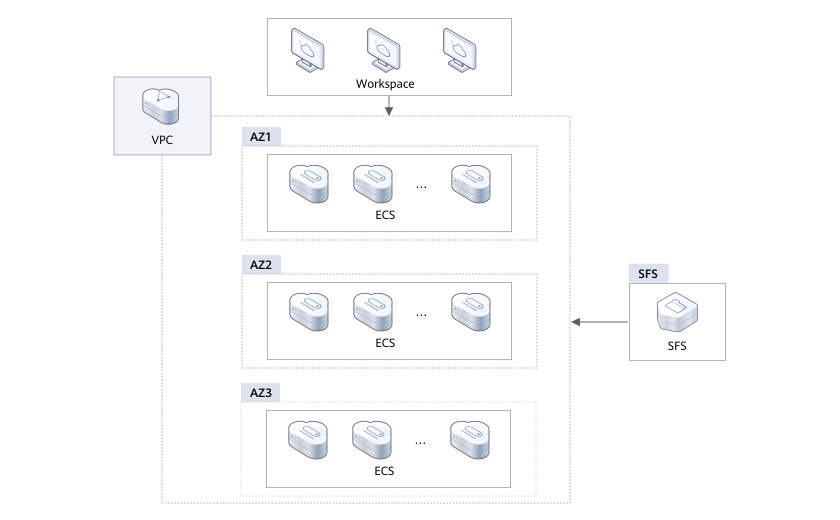
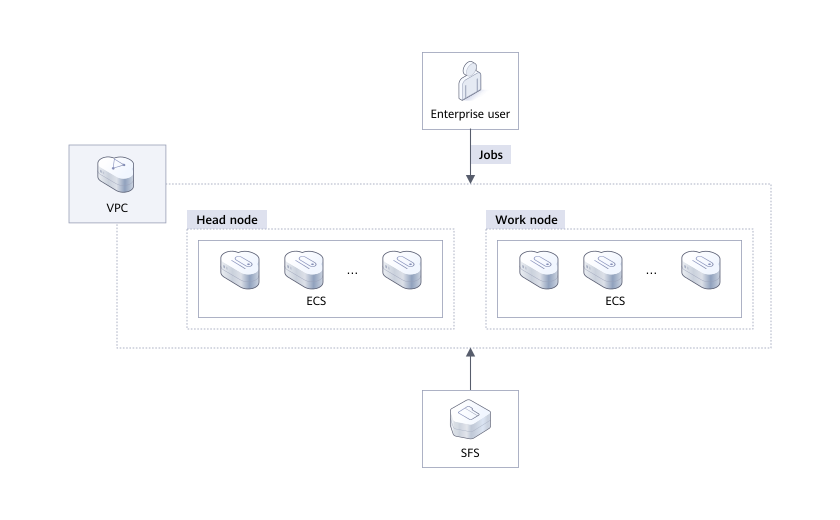
Product Advantages
-
Durable
A multi-level reliability architecture ensures a data durability of 99.99999999% (10 nines) and service availability of 99.95%.
A multi-level reliability architecture ensures a data durability of 99.99999999% (10 nines) and service availability of 99.95%.
-
Efficient
High IOPS, low latency, and high bandwidth options are all offered so you can design a storage solution tailored to your specific performance needs.
High IOPS, low latency, and high bandwidth options are all offered so you can design a storage solution tailored to your specific performance needs.
-
Easy to Use
Fully-hosted file storage frees you from the complexities of hardware deployment and maintenance. Leave the infrastructure to us.
Fully-hosted file storage frees you from the complexities of hardware deployment and maintenance. Leave the infrastructure to us.
-
Secure
HUAWEI CLOUD security comprehensively secures your data. VPC-based user authentication keeps your data isolated in your own cloud.
HUAWEI CLOUD security comprehensively secures your data. VPC-based user authentication keeps your data isolated in your own cloud.
SFS Resource Security
Auditing
Cloud Trace Service (CTS) records operations on the cloud resources in your account. You can use the logs generated by CTS to perform security analysis, track resource changes, audit compliance, and locate faults.
After you enable CTS and configure a tracker, CTS can record management and data traces of SFS for auditing.
For details about how to enable and configure CTS, see CTS Getting Started.
For the SFS management and data traces supported by CTS, see Auditing.
Risk Monitoring
SFS uses Cloud Eye to perform monitoring over resources, helping you monitor your file system usages in real time. You can monitor the number of client connections, bandwidth, IOPS, and capacity of SFS file systems in real time.
For details about supported SFS metrics and how to create alarm rules, see Monitoring.
Relationships Between SFS and Other Services
|
Function
|
Related Service
|
Reference
|
|---|---|---|
A file system and the servers must belong to the same project. File systems are mounted to shared paths for data sharing. |
Elastic Cloud Server (ECS) |
|
VPC provisions an isolated virtual network environment defined and managed by yourself, improving the security of cloud resources and simplifying network deployment. A server cannot access file systems in a different VPC. Before using SFS, assign the file system and the servers to the same VPC. |
Virtual Private Cloud (VPC) |
|
IAM is an enterprise-level self-help cloud resource management system. It provides user identity management and access control functions. When an enterprise needs to provide SFS for multiple users within the enterprise, the enterprise administrator can use IAM to create users and control these users' permissions on enterprise resources. |
Identity and Access Management (IAM) |
|
Once you have subscribed to SFS, you can monitor its performance, such as the read bandwidth, write bandwidth, and read write bandwidth on Cloud Eye, which does not require any plug-ins. |
Cloud Eye |
|
Cloud Trace Service (CTS) allows you to collect, store, and query cloud resource operation records and use these records for security analysis, compliance auditing, resource tracking, and fault locating. With CTS, you can record operations associated with SFS for later query, audit, and backtrack operations. |
Cloud Trace Service (CTS) |
Mount the file system to ECSs so that they can share the file system.
Mount the file system to ECSs so that they can share the file system.
Before creating a file system, ensure that at least a VPC and an ECS have been created and the ECS belongs to the created VPC.
Videos
SFS Service Introduction
03:04
Creating a File System and Mounting It on a Linux ECS
05:51